
Fryse tracks your food so you eat it before it goes bad.
Fryse is a free Android app that tracks the food in your fridge, freezer and pantry. Add food from a photo of your receipt, see what expires first, and get recipes that use it up. Everyone in your household shares the same kitchen.

Free on Google Play.
No barcodes to scan.
One kitchen for your household.
- CHKN THIGHS 4PK4.50
- BABY SPINACH 5OZ2.29
- GREEK YOGURT 16OZ3.49
- WHOLE MILK 1GAL3.89
- FROZEN PEAS 12OZ1.79
- SALMON FILLETS 2PK6.99
- BASMATI RICE 2LB2.99
- DICED TOMATOES0.89
- SOURDOUGH LOAF4.25
Fryse reads the receipt, files each food where it keeps best and estimates how long it has left. You can change either before the food is added. Point at a line to see where it went.
Fridge 4 items
- 1DAYChicken thighs4 pieces
- 2DAYSBaby spinach1 bag
- 4DAYSGreek yogurt16 oz
- 6DAYSWhole milk1 gallon
Freezer 2 items
- 3MONTHSFrozen peas12 oz
- 2MONTHSSalmon fillets2 fillets
Pantry 3 items
- 9MONTHSBasmati rice2 lb
- 6MONTHSDiced tomatoes1 can
- 3DAYSSourdough1 loaf
What is Fryse, and is it right for me?
Fryse is a kitchen inventory and food waste app for Android. It keeps a shared list of the food a household has, shows what will expire first, and suggests recipes built from those foods so they get eaten instead of thrown away.
It suits households on Android who want a receipt photo to do the typing. If you mostly buy packaged goods and want exact product details, or you need an iPhone app, a barcode pantry app is the better choice. If you live alone and shop every few days, a note on the fridge may be enough.
Fryse facts
- Platform
- Android phones (Google Play); no iPhone app as of November 2026
- Price
- Free; Fryse Plus is an optional subscription for the whole household
- Adds food by
- Receipt photo, food photo, pasted list, typing
- Tracks
- Fridge, freezer, pantry and leftovers
- Languages
- English, German, Spanish, French, Portuguese and Russian
- Best for
- Families, couples and roommates
- Made by
- Shogun Software Ltd, United Kingdom
How does Fryse work?
-
Add what you bought
Photograph your receipt, photograph a food, paste a list or type it in. Fryse reads it and shows you the food it found.
-
Fryse puts it away
Each food is filed under fridge, freezer or pantry with an estimated expiration date. Change any that are wrong, then keep the ones you want.
-
Use soon, then cook
The Use soon card shows what expires first. Tap Cook with these and Fryse writes a recipe around those foods.
What does Fryse look like?
These are real screens from the app, in its dark theme. There is a light one too.
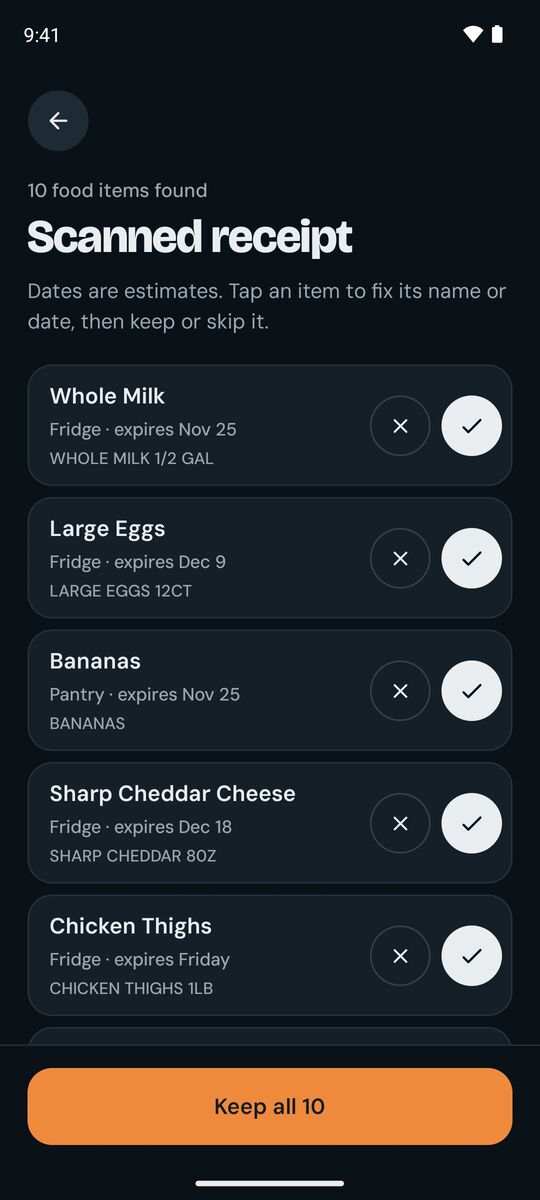
Scan a receiptEvery line becomes a food with a place and an estimated date. Keep or skip each one. 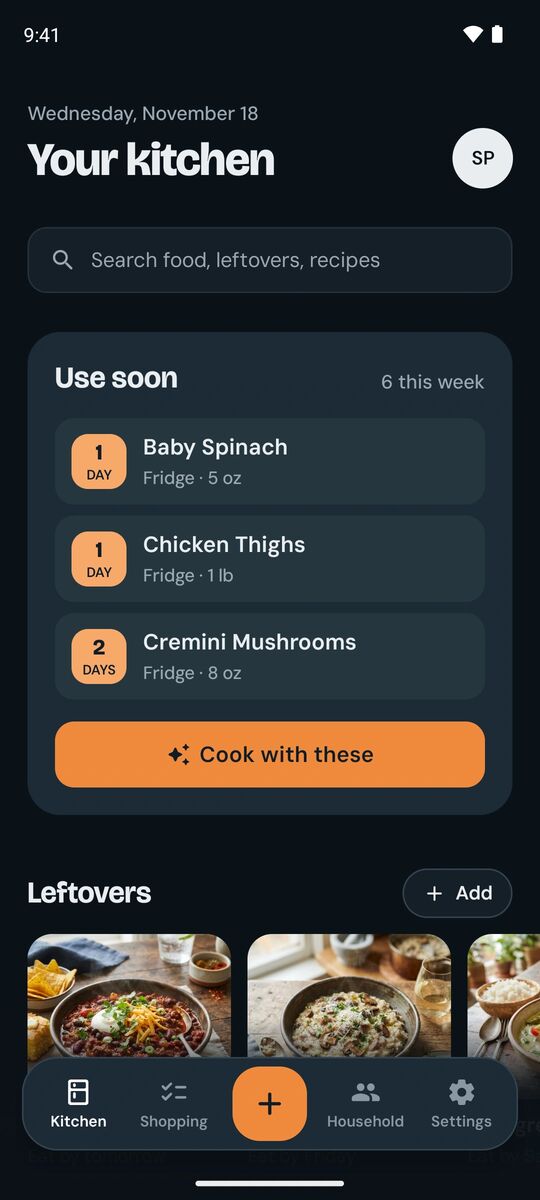
See what to use firstUse soon sits at the top of Home, with the days each food has left. 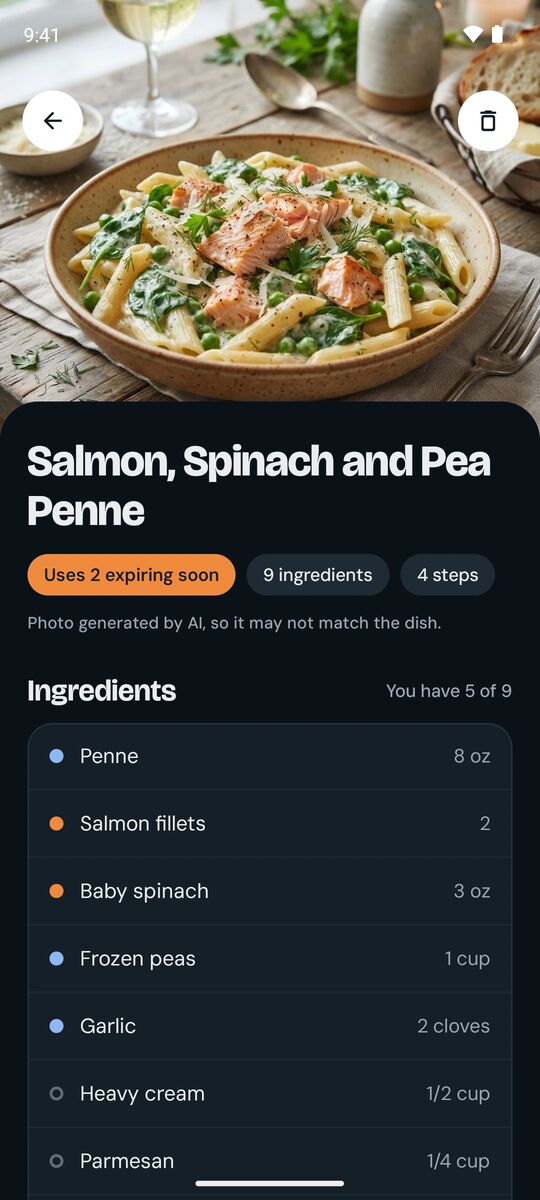
Cook what's expiringA recipe written around your food, showing what you have and what's missing. 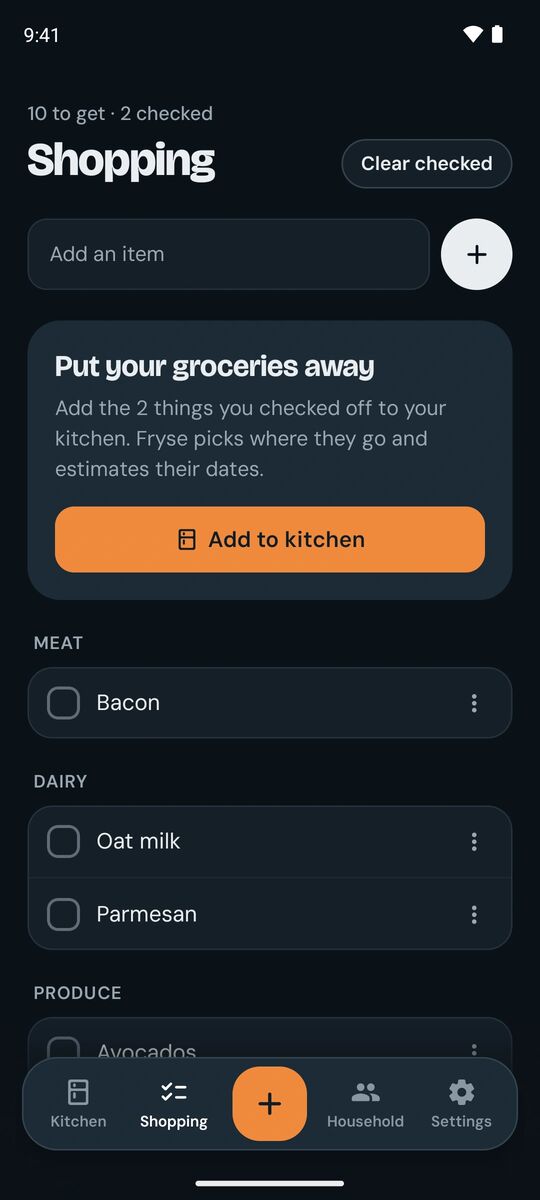
Shop for the restThe shopping list sorts itself into the store's sections.


Which food should I eat first?
Whatever has the fewest days left. Fryse puts a day count on every food with a date and lists the three that run out soonest in the Use soon card at the top of Home.
-
Expiration tracking
Each food shows where it's kept and how long it has left, such as "Fridge · 1d left". Food that needs no date, like rice, shows only where it is.
-
Recipes from what's expiring
Fryse writes a recipe around the food that's running out, marks which ingredients you have and can put the rest on your shopping list. When you've cooked it, say what you used and that food leaves your kitchen.
-
Leftovers
Save what's left of a recipe you cooked, or add any dish by name, with an eat-by date. Leftovers have their own row on Home and are in the reminder on their day.
-
Orange means eat it soon
Food with two days or less is marked orange and food with three to six days amber. Everything else stays gray, so the food that needs eating is the food you notice.
An example. Fryse writes each recipe around your own food.
What else can Fryse do?
-
Receipt scanning
Photograph a grocery store receipt and Fryse turns each line into a named food with a quantity, picks where it's stored and estimates how long it keeps. You check the list, change anything that's wrong, and keep or skip each food.
How receipt scanning works -
Photo of the food
Without a receipt, photograph a food and Fryse names it and suggests where to keep it. One food per photo.
-
Storage suggestions
Type in a food, leave storage on Auto, and Fryse files it under fridge, freezer or pantry. You can move it.
-
A reminder on the day
At around 8am Fryse sends one notification listing what expires that day. On a day with nothing expiring, it sends none.
-
A shopping list that sorts itself
When you use the last of something, Fryse offers to put it on the list. Items are grouped into meat, dairy, produce and pantry, and food you check off can go into your kitchen with a place and an estimated date.
-
One kitchen for the household
Up to six people join with a QR code or a short code and see the same food, leftovers, recipes and shopping list.
How to share a kitchen
Common questions about Fryse
Read all questionsIs there a free app that tracks food expiration dates?
Yes. Fryse is free on Android. It tracks expiration dates for the food in your fridge, freezer and pantry and shows what to use first. Fryse Plus is a paid subscription, and optional.
Do I have to scan barcodes?
No. Photograph your receipt or the food itself, or paste a list. Fryse fills in each food's name and where it's kept, and for food from a receipt an estimated date.
Can my family share one list?
Yes. Invite them with a QR code or a short code and everyone sees the same food, leftovers, recipes and shopping list.
Is Fryse on iPhone?
Not as of November 2026. Fryse is on Android phones through Google Play.
Get Fryse free on Android
Scan this week's receipt and see what to cook tonight.